Pre-release · v0.6 · MIT License
AI assistant inside
Ableton Live
LLM-r is a self-contained VST3 plug-in. Load it in any track, type what you want, and review a safe Ableton operation plan before it touches your Live set.
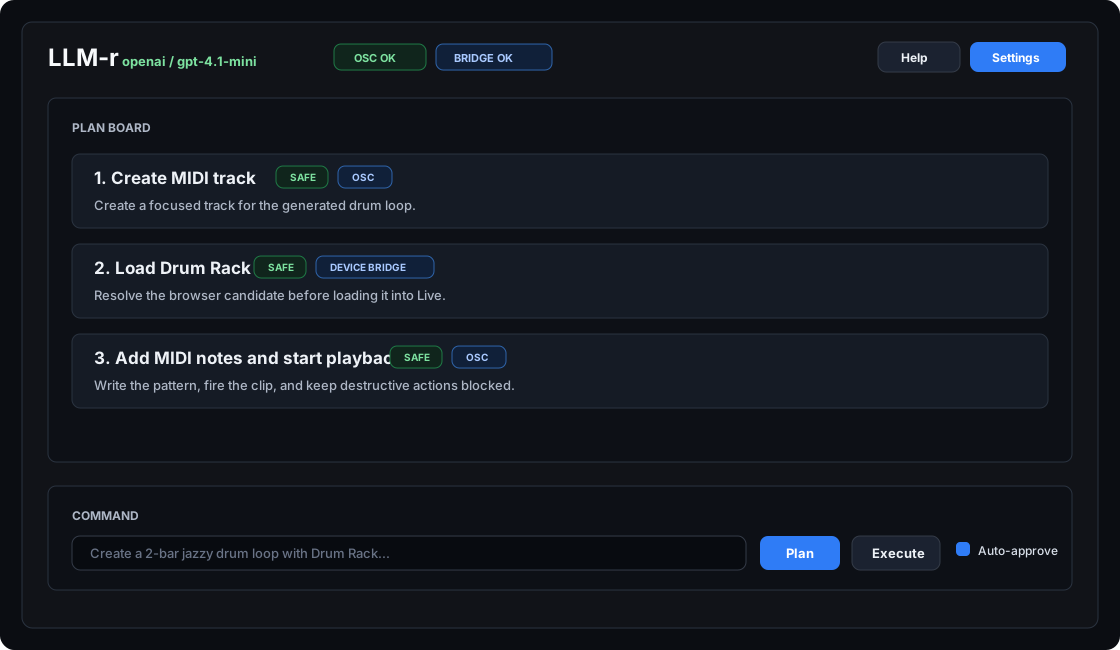
LLM-r is a self-contained VST3 plug-in. Load it in any track, type what you want, and review a safe Ableton operation plan before it touches your Live set.
A focused toolkit built around safety, extensibility, and a clean API.
POST a free-text prompt to /api/plan; LLM-r returns a typed, validated action plan grounded in a strict capability schema.
Dry-run mode previews every plan without sending actions. Destructive actions (track delete, stop-all) require an explicit approval flag.
Self-contained chat interface living inside Ableton Live. Settings panel, Ollama management, persistent API keys — no server or terminal needed.
Named action sequences (idea_sketch, performance_prep, ...) with full CRUD via the API and persistence across restarts.
Inspect live-state context, including clips and notes created through LLM-r plus recognized AbletonOSC replies.
POST /api/stream streams LLM completions as server-sent events, ready to wire into any chat or agent frontend.
Add notes with pitch, timing, duration, velocity, and mute state. Remove or clear notes by known pitch/time ranges with approval.
Adjust existing audio clip gain, transpose, detune, warping, warp mode, RAM mode, and clip loop or marker properties.
Query parameter values and names, set single or bulk parameter values, and delete devices by track/device index.
Works with any provider supported by Modelito
Build the VST3 plug-in, load it in Live, and start chatting with your session. Or use the desktop GUI or HTTP API for headless workflows.
Run the two build scripts. Requires macOS and Xcode CLI tools.
Install AbletonOSC as a MIDI Remote Script. For device loading, also enable the bundled LLMRDeviceBridge Remote Script.
Add LLM-r as a VST3 instrument on any track. Open ⚙ Settings inside the plug-in and enter your LLM provider and API key.
Type a request and press Plan. Review the plan, then click ▶ Execute — or keep Dry run on to preview first.
# build and install the plug-in
git clone https://github.com/krahd/LLM-r.git
cd LLM-r
bash scripts/build_vst3.sh
bash scripts/install_vst3.sh
# install and start the server
pip install -e ".[gui]"
llmr serve

# plan & execute
curl -s -X POST http://127.0.0.1:8787/api/plan \
  -H "Content-Type: application/json" \
  -d '{"prompt": "Set tempo to 120"}'
The full catalog is always available at GET /api/capabilities at runtime.
| Tool | Domain | Destructive | Key args |
|---|---|---|---|
| set_tempo | song | bpm: float | |
| song_play / song_stop | song | - | |
| song_record | song | record: bool | |
| song_set_time_signature | song | numerator, denominator | |
| song_set_global_quantization | song | quantization: int | |
| create_midi_track / create_audio_track | tracks | index: int | |
| track_delete | tracks | yes | track_index: int |
| track_duplicate / track_rename | tracks | track_index, name | |
| set_track_volume / track_set_pan | tracks | track_index, value | |
| set_track_mute / set_track_solo / arm_track | tracks | track_index, bool | |
| fire_scene / fire_clip | session | scene/track/clip index | |
| stop_all_clips | session | yes | - |
| scene_create / scene_delete / scene_rename | session | delete: yes | scene_index |
| clip_create / clip_delete | session | delete: yes | track_index, clip_index |
| clip_duplicate_loop / clip_duplicate_to | clips | source and target clip indexes | |
| clip_rename / clip_set_color | clips | track_index, clip_index, value | |
| clip_set_loop_* / clip_set_*_marker | clips | track_index, clip_index, beats | |
| midi_notes_get / midi_notes_add | midi | track_index, clip_index, notes | |
| midi_notes_remove / midi_notes_clear | midi | yes | track_index, clip_index, optional range |
| clip_set_gain / clip_set_pitch_* | audio | track_index, clip_index, value | |
| clip_set_warping / clip_set_warp_mode | audio | track_index, clip_index, value | |
| device_load | devices | track_index, query, device_type, preset/path | |
| device_get_* / device_set_* | devices | track_index, device_index, parameter index | |
| device_delete | devices | yes | track_index, device_index |
| utility_undo / utility_redo | utility | - |
Device browser loading uses LLMRDeviceBridge. Plugin-chain loading, warp marker CRUD, render/export, and destructive sample editing remain outside the current runtime contract.